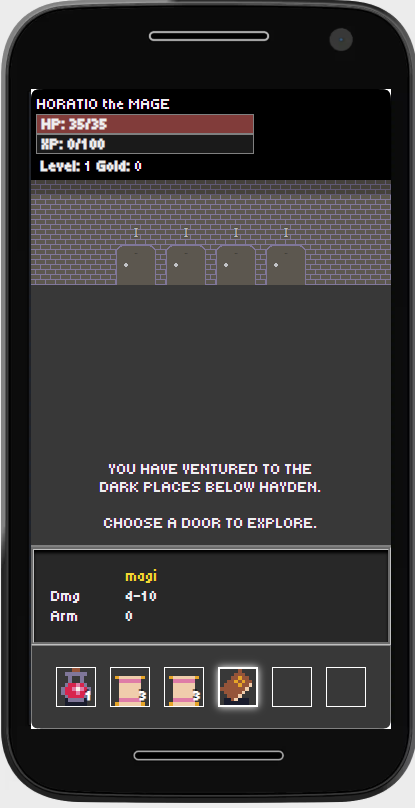
This summer I was playing a lot of a very dumb Starcraft II custom game called Zombie Zeat. It’s an incredibly grindy roguelite-lite and I was hopelessly addicted to it. I had to do a fair amount of traveling at the time and was jonesin’ for some Zeat while I was in the airport, so I built a mobile first web game to play while I was endlessly delayed going to and from LaGuardia.
Here’s some technical info no one cares about.
Stack
The game is built entirely in native HTML, JS, and CSS. A little Node.js is used for the editor. The game is intended for mobile and has a PWA manifest for “installs.” It also runs on desktop, though it’s not as glamorous.
Basics
You are in a dungeon! You have doors you can choose. Each door has a number above it. This number tells you how difficult the room is going to be. Entering a room, you will find enemies! You click on the enemies to attack. Your attacks are made stronger by leveling up and increasing strength, and by finding items that give you bonus damage and abilities.
Gold doors indicate shops, where you can sell items in your inventory and buy new items. Staircases indicate going down a floor, which introduces new enemies and greatly increases difficulty.
You level up by killing foes and gaining XP, which is derived from enemy strength. Death is permanent.
Items and Abilities
The player has an inventory, which is an array of Items. These Items are objects defined in a database (fancy JSON file) which are then loaded into an array in game and can be added to the players inventory. Items can be defined manually in JSON, or built using a handy dandy item editor, creatively named Dungeon Editor.
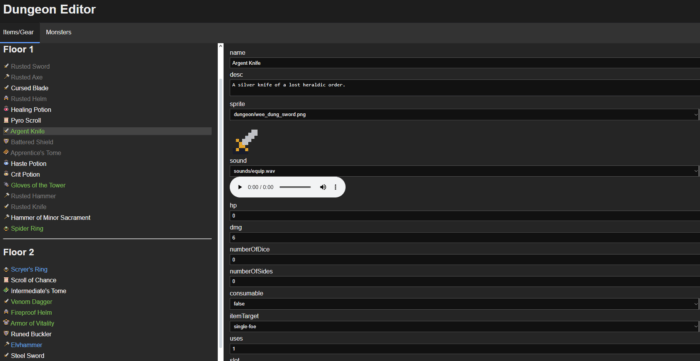
All of the legal JSON properties of items are turned into HTML input fields, which, when edited, automagically save to the database via the power of AJAX calls and a Node backend.
We’ll glean a lot about how the game works by running down the list of properties. Don’t want to? Too bad, we’re gonna run through them anyway. You’re gonna learn about how the system works and you’re gonna be PLEASED about it!
- name: The item name, as it appears in game.
- desc: The description of the item, which appears in the little window you see clicking on the item in a shop, chest, or in your inventory.
- sprite: The sprite that represents the item in shops, chests, and inventory (we auto populate the dropdown here via a glob, or the JS equivalent of a glob).
- hp: Bonus HP granted to the player for either just having the item in their inventory if the item is not equippable, or having it equipped if it is equippable
- dmg: Bonus DMG granted to the player with same caveats as above.
- number of dice: When we attack, we take the base damage and add a random dice roll based on number of dice and number of sides. Why do it this way and not just with a random number? I find it’s easier to conceptualize the impact of the attack in the format of dice rolls vs just a random number.
- number of sides: Number of sides on one of the dice. See above.
- consumable: Whether this is an item that has a number of charges. When you get to zero charges, the item is removed from your inventory.
- uses: The number of charges this item has, if it’s consumable.
- item target: Whether this targets one enemy, multiple enemies, all enemies, or self.
- slot: Equippable items occupy a slot, ie, helmet, gloves, belt, main hand, off hand, two handed. A player can only have one item equipped in a slot at a time, and in the case of weapons, a player can only have a main hand+off hand or a two handed weapon. If the player has a main hand or off hand weapon equipped and then equips a two handed weapon, the main hand and off hand are automatically unequipped.
- effect type: There are a variety of damage and armor types which interact in various ways. They are physical, magic, curse, chaos, poison, and holy. Damage types are strong/weak to various armor types, and some give status effects. Curses have a change to make the foe miss, poison does damage over team, holy has a change to heal the attacker and does extra damage to undead enemies. Enemies can also have weaknesses specified to various damage types.
- minimum drop floor: In Hayden you start at floor zero and go progressively lower. As you go lower, items become stronger as do enemies. The minimum drop floor specifies the lowest floor at which the item will drop.
- minimum drop player level: Minimum player level for this item to drop.
- rarity: Dictates the likelihood of a weapon to drop.
- armor: How much armor this grants.
- armor type: See effect type.
- gives status effect: If specified, grants a status effect to the target. These can be positive or negative, ie, healing every turn, damage over time, stun, etc.
- value: How much the item sells for or costs in a store.
More complex abilities are hard coded. While I could have created a more complex and robust editor to support complex abilities, I decided to keep scope small and have status effects be the most complicated thing you could define in editor, and more complex abilities defined in code.
Monsters
The core loop of the game is entering rooms, fighting monsters, and looting chests. Monsters, like Items, are populated from a JSON database.
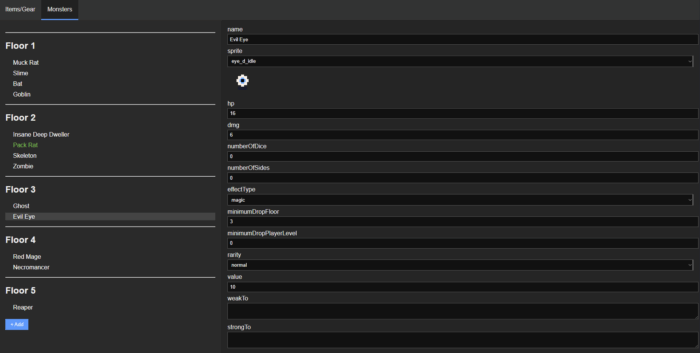
Let’s run down the properties of monsters, because we’ve come this far and we’re not giving up here.
- name: Enemy name as it appears in game
- sprite: Sprite for the monster, as it appears on the battlefield
- dmg: Base damage for a monster when it attacks.
- number of dice: Additional random damage, as represented with dice rolls.
- number of sides: Number of sides per each die for additional damage.
- effect type: The type of damage this attack does, ie, magic, physical, etc. See Items for more info on this.
- minimum drop floor: The lowest floor at which this monster will appear.
- minimum drop player level: The lowest player level at which this monster will appear.
- rarity: The likelihood this monster will appear.
- value: Unused field. This space available.
- weak to: Damage types that will do bonus damage against this monster
- strong to: Damage types that will do less damage to this monster.
Leveling
Players gain XP by killing monsters. Reaching a threshold (100 * (player.level ** 3)) increases player level by one and sets current XP to zero. Every time the player levels they can choose to either increase their base HP by 10 or base DMG by 2. Each class has a damage type (ie, Paladin is Holy damage, Mage is Magic damage), and, though they can do multiple damage types by equipping weapons, only their base damage is increased by leveling. On top of increasing the amount of damage a player does with their base attacks, increasing a damage type increases the efficacy of items.
Credits, Acknowledgements, and Disclosures
Inspiration for gameplay, mechanics, and systems comes from Munchkin, Warcraft, and Zombie Zeat.
Sprites are primarily taken from the Oryx Wee Fantasy pack. Some additional sprites and animations were done by me.
Music is original, sounds are a mix of original, BFXR generated, and from The Essential Video Game Sound Effects Collection.
The editor was created with the help of AI to for some of the Node backend implementation. I was not especially interested in implementing the drudgery of converting JSON objects into HTML fields, and as such I leveraged ChatGPT. An initial prototype of the core concept (enter room, kill monster, next room) was created with the assistance of AI, but none of that code is used in the current state of the game.